


I found Stocks: Realtime Quotes Charts most useful when I treated it as a focused market-watching tool rather than a complete investing platform. It is a free finance app from StockSpy Apps Inc. that brings quotes, charts, news tracking, and portfolio watchlists into one mobile workspace. In my experience, that combination makes it convenient for checking a few companies during the day, comparing movement, and keeping an eye on a personal list without opening a full desktop terminal.
Its strongest quality is not that it tries to do everything. The appeal is the quick path from a company name to its current market view, chart, related news, or watchlist position. That makes it approachable for someone who wants more context than a basic stock quote, while still being less intimidating than professional trading software. The app is free to start, rated for Everyone, and has become a well-established choice, with an average score of 4.8 from around 27 thousand ratings and over a million installs.
How clearly the app presents market information
Readable at a glance, but information density still matters
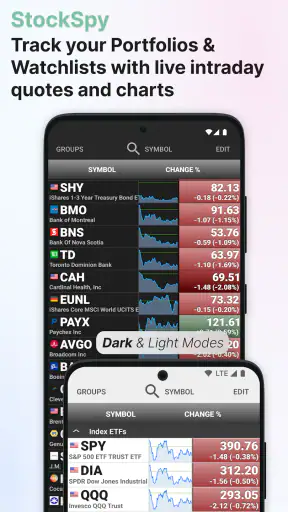
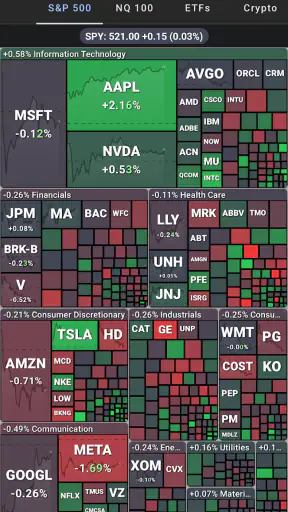
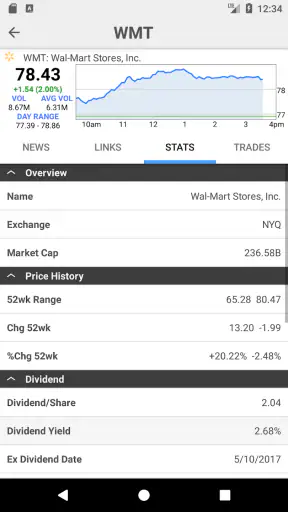
The central experience is built around financial information, so clarity matters more than decoration. Quotes and chart views are easier to understand when I already know which symbol I am following, and the watchlist approach reduces the need to search repeatedly for the same companies. I can use it as a quick morning check, then return later to see whether a price move is worth investigating through the associated news.
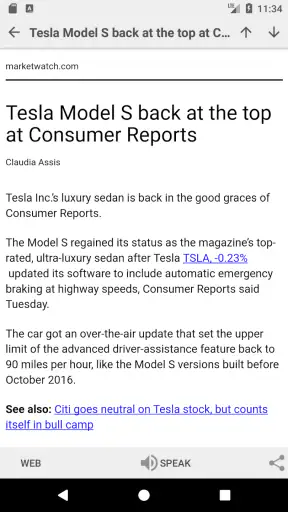
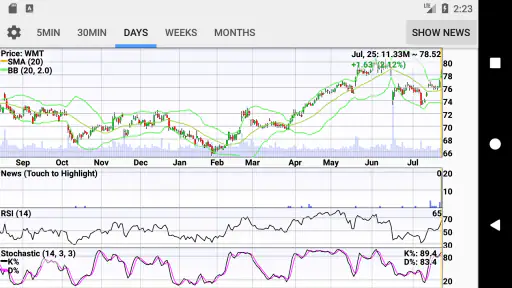
That workflow is especially helpful for people who prefer visual confirmation. A number alone can tell me where a stock is trading, but a chart gives a sense of direction and recent behavior. I would not mistake that visual context for a prediction, yet it helps me avoid reacting to a single isolated quote. The news tracker adds another layer: instead of treating a movement as a mysterious number, I can look for reporting that may explain why attention has shifted.
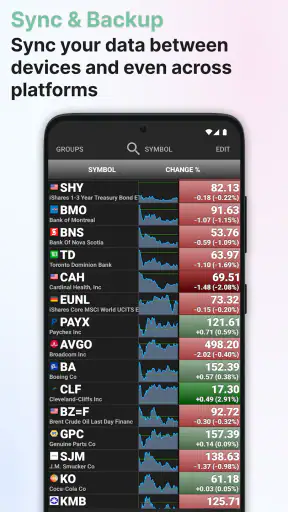
The interface is most comfortable when I keep my watchlist purposeful. A long collection of symbols can turn a useful overview into a wall of figures. I recommend separating companies I actively follow from names I am merely researching, if the app’s available organization options suit that workflow. That small habit improves readability more than repeatedly changing screens or trying to monitor everything at once.
Navigation that supports different levels of experience
I think the app works best for two kinds of users. A beginner can start with a handful of familiar companies and learn how quotes, charts, and news relate to one another. A more experienced investor can use the same screens as a lightweight monitoring layer while keeping research and orders elsewhere. The app does not need to replace a broker to be useful.
There is also a practical distinction between checking information and acting on it. I like that a watchlist encourages observation before a decision. When I am commuting or taking a short break, I can review movement without immediately entering a trade. For a new investor, that separation is valuable because the app functions more like a dashboard than a pressure-filled transaction screen.
Still, financial interfaces can be difficult for anyone who finds dense numbers, abbreviations, or changing visual elements tiring. Even a clean layout can demand frequent interpretation: price, direction, chart scale, news relevance, and portfolio context all compete for attention. I would use the app in short sessions rather than expecting it to be a relaxed reading environment for extended research.
Useful reading habits for charts and news
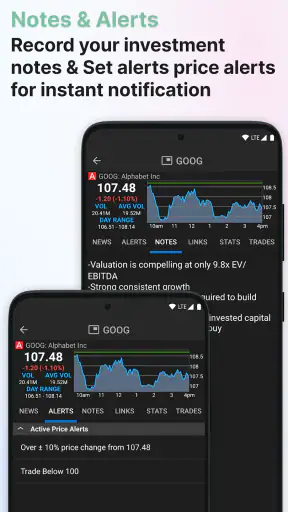
One non-obvious strength is the way the different information types can be used as a checking sequence. I start with the watchlist, open the chart only when a movement catches my attention, and then review news before forming an opinion. That order prevents me from opening every article or staring at every graph without a question in mind.
I also find it helpful to compare the same company at different moments instead of relying on one glance. A quote is a snapshot; a chart gives context; news gives possible explanation. None of those elements should be treated as a complete investment case, but together they make the app more useful than a plain quote widget. This is one of the clearest reasons to choose it over a basic finance page.
Motor and sensory considerations during everyday use
For users with limited fine-motor control, the main challenge is likely to be the precision needed to select a symbol, move between views, or inspect a chart. Market apps naturally involve small targets and scrolling through changing information. I would use the app on a stable surface when possible, especially when reviewing a chart rather than performing a quick quote check.
People who experience visual fatigue may benefit from limiting the number of symbols they follow at one time. A compact watchlist creates less scanning work than a broad market screen. I would also avoid using it as my only source of information in poor lighting or while moving, because financial figures and chart details are easy to misread when attention is divided.
Color can also affect how quickly someone interprets market movement. I would not rely on color alone to understand whether a position is doing well or poorly; the numeric quote and chart direction deserve equal attention. This is a sensible habit for anyone, and particularly important for people who do not distinguish certain colors easily. The app is more usable when I read the values rather than treating the visual palette as the entire message.
For users who prefer reduced sensory load, the news side may require more discipline than the quote side. Headlines can create urgency, while price changes invite repeated checking. I recommend setting a simple routine: review the watchlist at chosen times, investigate only meaningful changes, and close the app afterward. That turns it into a tool for information rather than a source of constant distraction.
Situational access: where the app fits well
A realistic use case is a person who follows a few companies while working a normal day. During a lunch break, I can open the watchlist, notice an unusual move, inspect the chart, and read related news. If the change does not matter to my plan, I can leave it there. If it does deserve attention, I have enough context to continue research later on a larger screen.
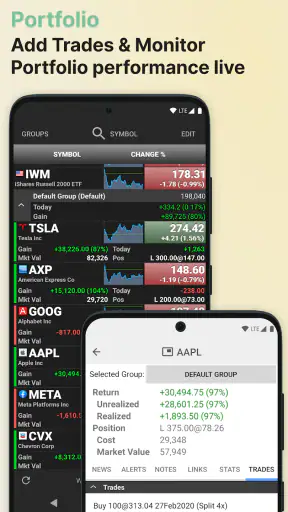
It is also useful before a conversation with a financial adviser or before reviewing a personal portfolio elsewhere. The app gives me a quick way to refresh my memory about the companies I care about. I would not use that convenience as a substitute for account records, tax information, or a broker’s execution tools, but it can make those more detailed sessions better prepared.
For someone with limited time, the watchlist is more practical than browsing broad market coverage. For someone with limited data attention, however, the opposite may be true: a small number of carefully chosen symbols is much easier to manage than a constant stream of updates. The app adapts well to short check-ins, but it is less suitable when I need a calm, linear explanation of a complex investment decision.
Who should use it, and who should look elsewhere
I would recommend it to casual investors, long-term holders, students learning how markets are discussed, and anyone who wants quotes, charts, news, and watchlists in one place. It is particularly good for monitoring rather than executing. The free entry point makes it easy to try without committing to a subscription, while optional in-app purchases ranging from $0.99 to $11.99 per item may matter to users who want more from the experience.
I would be more cautious about recommending it to active traders who need advanced order handling, specialist analysis, or a broker-connected workflow. A dedicated brokerage app is a better choice when the main goal is placing and managing trades. Likewise, someone who wants deep company research, portfolio tax reporting, or a full financial plan should look beyond a quote-and-news tracker.
The app is also not ideal for a reader who wants every market concept explained in plain language. It presents financial information efficiently, but efficiency can assume some familiarity. Beginners can learn through it, yet they should take time to understand terms and avoid treating a rising chart or a prominent headline as advice.
Remaining barriers and practical workarounds
The biggest barrier is cognitive rather than technical: the app can show several relevant signals without telling me which one deserves the most weight. A price move may be temporary, a headline may be incomplete, and a chart may encourage patterns that are not meaningful. I solve this by writing down the question I am trying to answer before opening the app, such as whether a company has moved unusually or whether new coverage explains the change.
Another limitation is that a mobile screen is not a desktop research environment. Comparing several companies, reading long news items, and keeping notes can feel cramped. My workaround is to use Stocks: Realtime Quotes Charts for discovery and monitoring, then move to a larger screen or a more specialized service for detailed analysis. That division of labor keeps the app from being judged for a job it was not designed to perform.
Cost also deserves attention. The app itself is free, but the presence of optional purchases means I would check what is included before paying for anything. A person who only needs occasional quotes may never need an upgrade. Someone who wants a more complete experience should decide whether the added value fits their routine rather than assuming every extra is necessary.
Accessibility needs vary widely, and I would test the app personally with the device settings and interaction methods I rely on. A user who needs very large text, strong contrast, screen-reader-friendly controls, or specialized input should make sure the actual screens work comfortably on their phone before making it a primary finance tool. I see the app as reasonably approachable for quick visual monitoring, but not as a guaranteed fit for every access need.
Version, support, and long-term usability
The current version is 13.5, and the app requires Android 6.0 or later. That gives it a broad place on compatible Android devices, including phones that are not recent. The long-running presence of the app also helps explain why it feels like a mature monitoring product rather than a newly launched experiment; it was released on March 4, 2013.
That history is useful, but it does not remove the need to judge the current experience on the device in hand. Older phones may make financial screens feel slower or less comfortable, and a small display can increase the effort required to inspect charts. I would install it on the phone I actually carry, create a modest watchlist, and test the full quote-to-chart-to-news routine before relying on it every day.
My inclusive verdict
After using it as a market monitor, I see Stocks: Realtime Quotes Charts as a practical middle ground. It is more informative than a simple stock-price screen because it connects quotes with charts, news, and watchlists. At the same time, it remains lighter and less intimidating than a professional trading terminal. That balance is its main reason to exist.
The best experience comes from treating it as a clear, limited-purpose dashboard. Keep the watchlist small, read numbers as well as colors, use charts for context rather than prediction, and check news before drawing conclusions. Those habits make the app more accessible to people who need short, structured sessions and reduce the risk of being pulled into constant market watching.
My final recommendation is positive for anyone seeking a free way to follow selected companies and build better market-awareness habits. I would choose a broker for trading, a research platform for deep analysis, and a larger-screen solution for extended reading. For quick checks and organized monitoring, however, Stocks: Realtime Quotes Charts earns its place, especially for users who value a straightforward route from a quote to the information surrounding it.
It is not a universal finance solution, and its dense subject matter can still create barriers for people who need highly customized presentation or input support. But when used within its strengths, the app gives different users a manageable way to stay informed without demanding a full professional setup. That makes Stocks: Realtime Quotes Charts a sensible starting point for everyday market tracking, provided I remain aware of what the numbers can show—and what they cannot decide for me.


